
Traceability, OEE
and ERP integration.
In one system.
IndLine is the MES for industrial SMEs: it follows every product with an RFID tag, measures OEE, detects stops, manages shifts and production orders and exchanges data with your ERP. It has its own low-cost hardware and is installed on the factory's own server, with no cloud and no per-user licences.
A complete MES,
sized for an SME.
Traceability, OEE, shifts, downtime, production orders and ERP integration in the same system, with our own terminals at every station and screens on every line.
Traceability and sequence
Every product followed by an RFID tag. Every pass is recorded with who, where, when and the barcode, and a product cannot move on if an earlier station is missing.
How it works →Production and OEE
OEE per line (availability × performance × quality), with planned time, downtime by reason and the production target. It counts traced products and parts counted by the machine.
OEE and downtime →Shifts and downtime
Shifts with breaks, per line. Stops detected automatically during the shift, with a catalogue of stop reasons and reporting at the station by barcode.
OEE and downtime →Production orders
One order in progress per line, with progress in real time. The line switches model when the order starts, and the order completes on its own and gives way to the next one.
Production orders →ERP integration
Orders received from the ERP through a shared folder, REST API or file import, and the result sent back automatically, with no development on the ERP side.
ERP integration →IndControl terminal
Our own low-cost hardware at every station: RFID tag reader, barcode reader and a digital input to connect to the machine, detect stops and count parts.
Production terminal →Quality and audit
Non-conformities hold the product until it is repaired. Audit log of who changed what and when, useful in ISO 9001 and IATF 16949 audits.
Management and quality →Line screens
Per line, the day's output against the shift target, the day's OEE in colour, the stopped state and the progress of the production order in progress.
Line screens →On the factory's server
IndLine is installed on the factory's own server. It needs no cloud and no per-user licences, and it keeps working without an internet connection.
The system →Simple operation at the station,
complete verification by the system.
Every tag gets an immediate response at the station terminal, with sound, light and a message. No complex training and no manual data entry.
Operator clock-in
The operator presents their operator tag. The station becomes Busy (taken by them, green LED). Presenting the tag again clocks out.
Line entry
At the 1st station the product barcode is scanned and a validation tag is presented; it travels with the product to the end.
Each following station
The product tag is presented. The terminal checks the sequence, the minimum interval and any non-conformities. On success, the terminal sounds the confirmation signal and the status is updated immediately.
Product completed
At the last station the product is completed and the validation tag can be reused on another product.
Non-conformity. Quality records the defect with the product tag. The product is blocked at every station until it is resolved, then resumes where it left off.
Know how much the line produces and why it stops.
IndLine calculates the OEE of each line from what it already records: passes at the stations, parts counted by the machine, shifts and stops. Nobody fills in sheets.
OEE per line
Availability × Performance × Quality. Availability is planned time minus unplanned stops; performance compares actual output with the standard time of the bottleneck station; quality counts the products with no non-conformities.
Stops detected on their own
If a line produces nothing for a few minutes during the shift (10 by default, configurable per line), IndLine records a stop starting at the last output. It closes when production resumes, when a break starts or at the end of the shift.
Reason for each stop
Line leaders classify the reason in IndPersonal, or the operator reports it at the station by scanning a barcode. Planned stops do not penalise OEE.
Illustrative example of the calculation: 90 % × 85 % × 98 % ≈ 75 %. The planned stop does not count against availability.
Shifts and breaks
Each shift has a start and end time, weekdays and breaks, and applies to all lines or only to the chosen ones. Shifts that cross midnight are supported. Planned time and stop detection only count within the shift, excluding breaks.
Reason catalogue
Eight built-in reasons, all editable: breakdown, material shortage, operator shortage, model changeover/setup, quality problem, preventive maintenance, meeting/training and no planned work.
Stop reported at the station
IndPersonal generates an A4 sheet (PDF) with one barcode per reason, to post next to the line. The operator scans the code at the terminal and the stop is classified, with no menus or keyboards.
Machines without tag reading
The terminal's digital input detects whether the machine is running, even without tag reading: presses, injection moulding machines, automatic welding and long-cycle machines.
Parts counted by the machine
Each machine pulse can count as a part produced, with the number of parts per pulse configurable per terminal. These parts feed OEE, production orders and the line screens.
Where you see it
In IndPersonal Statistics, per line and period, with the list of stops and their duration, and in real time on the IndMonitor line screens.
From the ERP order to the line, paper-free.
Each order has a number, model, line, quantity, status (planned, in progress, suspended, completed) and notes. Products and counted parts are linked to the order in progress.
Create or receive
The order is created in IndPersonal, imported from a CSV or Excel file, or received from the ERP through the shared folder or the REST API.
Start
There is one order in progress per line. When it starts, the line automatically switches to the order's model.
Follow
Progress is visible in real time in IndPersonal and on the line screens, with traced products and parts counted by the machine.
Complete and move on
When the quantity is reached, the order completes on its own and the next one in the queue starts. Surplus parts carry over to the next order, with no over-counting.
The ERP plans, IndLine executes
and sends back the result.
Three ways to receive production orders and automatic return of the result, with no development on the ERP side.
Shared folder
The ERP drops CSV files with orders into a folder and IndLine imports them on its own every 30 seconds. Files with errors are set aside, with a report of the rejected rows. A repeated order number never creates a duplicate order.
REST API
With token authentication, and TLS when the server has a certificate. It lets you create production orders and query orders and their progress, production (products and parts), stops with their reason and OEE per line.
File import
Manual import of orders from CSV or Excel files in IndPersonal, for those who prefer to start without an automatic link.
Automatic return
At every status change of an order, IndLine writes a result file (quantity, done, rejected, start and end) and/or sends a webhook (HTTP POST in JSON) to the ERP.
Set up without coding
The administrator enables the API, generates and copies the token, and chooses the port, the input and output folders (in a server folder browser) and the webhook address, all in IndPersonal. Changes apply immediately, without restarting the server.
Your ERP
Compatible with any ERP that exports and imports files or uses an API, such as Primavera, PHC, Sage, SAP Business One or Odoo. The connection method is chosen with you during the site survey.
One central server,
the whole factory connected.
Four applications work together: the production terminal at each station, the central server, the line screens and the management application. Everything runs on the factory network and connects to the ERP.
The terminal at every station.
Each station has a production terminal with a tag reader, display, lights and buzzer, plus a barcode reader and a digital input for the machine. The hardware is built for each installation and the firmware is upgradable, so the terminal keeps up with the system as it evolves. The simulation alongside reproduces how the terminal works.
The result of every read is announced unambiguously: each situation has its own audible signal, together with the lights and a message on the terminal display.
Audible signals
Confirmationsuccessful validationClock-outoperator clock-outErrorerror signal, with a message on the display for 3 sDisplay messages
NOT AUTHORISEDproduct out of sequence; the second line shows the missing stationPRODUCT IN NCproduct with an open non-conformityHOLD THE TAGleave the tag on the reader; the terminal retries by itselfSTOP RECORDEDstop reason scanned from the barcode sheetSimulation of the terminal's screen, lights and sound. Start with the operator tag.
Digital input for machines
It connects to the machine's cycle signal, an inductive or photoelectric sensor, or a relay contact (24 V through an optocoupler), with built-in debounce and noise filtering. It detects whether the machine is running, even without tag reading.
Automatic part counting
Each pulse can count as a part produced, with the number of parts per pulse configurable per terminal. The parts feed OEE, production orders and the line screens.
Stop reasons by barcode
At any station with a barcode reader, the operator scans the reason from the sheet posted next to the line. The current stop is classified, or a new one is opened, and the terminal confirms on its display.
Central management of the whole system.
IndServer applies the business rules, calculates OEE, detects stops, manages production orders and ERP integration, and pushes the production status, second by second, to the screens and the management application. It runs on a Linux PC or mini-PC at the factory, or on an existing virtual machine.
Centralised configuration
Any change to stations, lines, tags or tasks made in IndPersonal reaches the terminals on its own. Nobody copies settings by hand.
“Plug in and pair” installation
A new terminal finds the server on the network and appears in IndPersonal as a pairing request. One click and it is working at the right station.
One station, several lines
A station can belong to several lines: the product tag tells which line. Station types: line entry, RFID validation and fixed station.
A complete view of the line, in real time.
A large wall screen shows one panel per station, in line order. Line leaders and operators see at once where there is work, who is at each station, where someone is missing and where there is a problem.
Output against target
Per line, the day's output against the shift target, and the number and progress of the production order in progress.
Day's OEE, in colour
Green from 85 %, amber from 60 %, red below. When the line stops, the screen shows it as stopped in real time.
One, several or all lines
Each monitor chooses which lines it shows. Each line has its own colour and name.
TV-ready
Starts straight in full screen, ideal for a TV or wall monitor. Dark or light mode.
Always in touch with the server
If the connection drops, the screen shows that the terminals keep recording locally.


Real IndMonitor with two lines. Yellow: free · green: busy or validated TAG · red: error · grey: terminal switched off.
From the station to the delivery forecast.
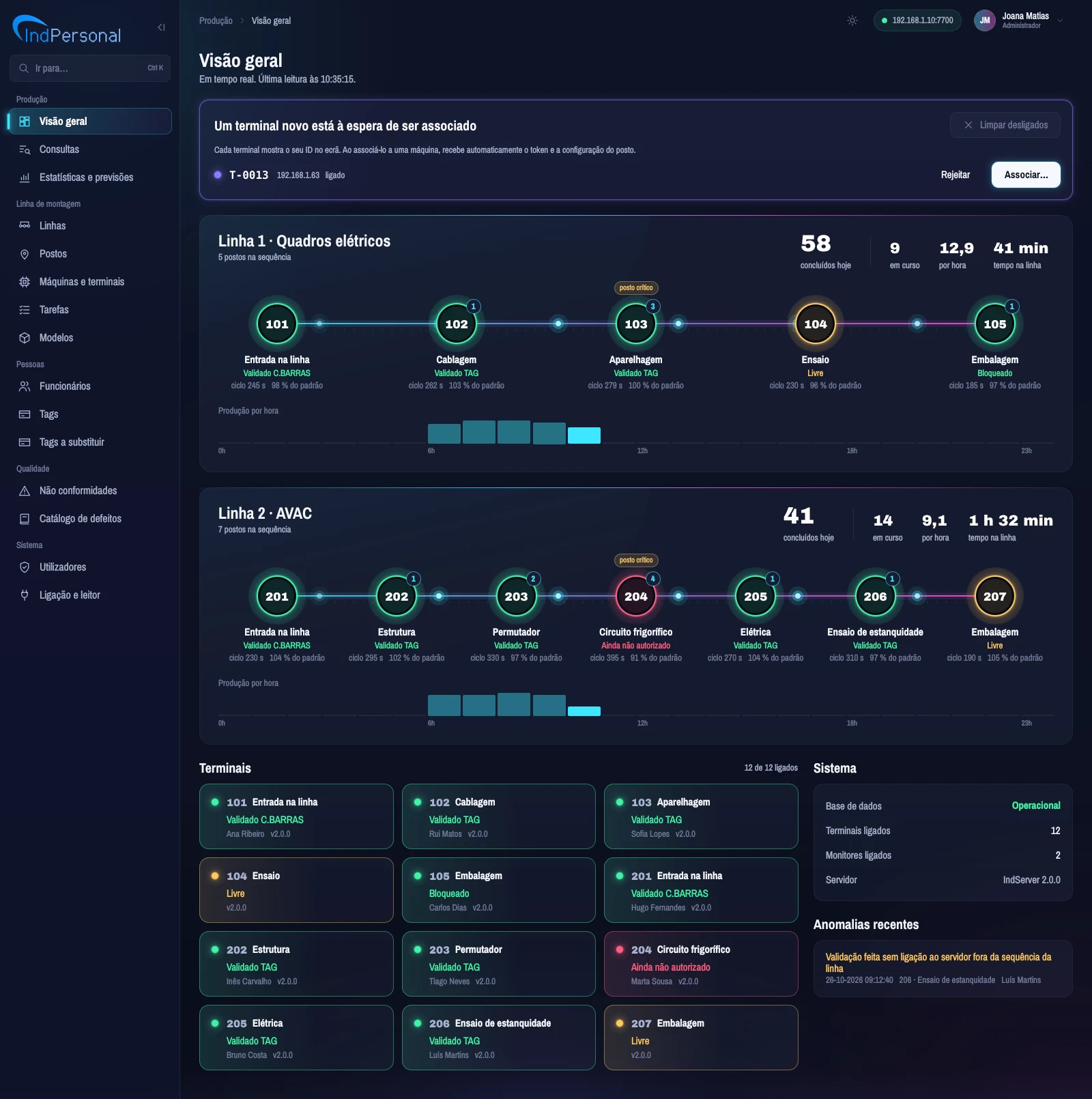
The management app shows, in real time, the same status as the factory monitors, with each line's production figures, the bottleneck and what needs attention.
Each line as a route
One circle per station in the status colour, the products waiting at each station, the bottleneck marker, the cycle time and efficiency against standard time.
The day's figures
Completed today, in progress, output per hour and time on the line.
What needs attention
Status of each terminal, new terminals waiting to be paired and recent anomalies.
One click on a station
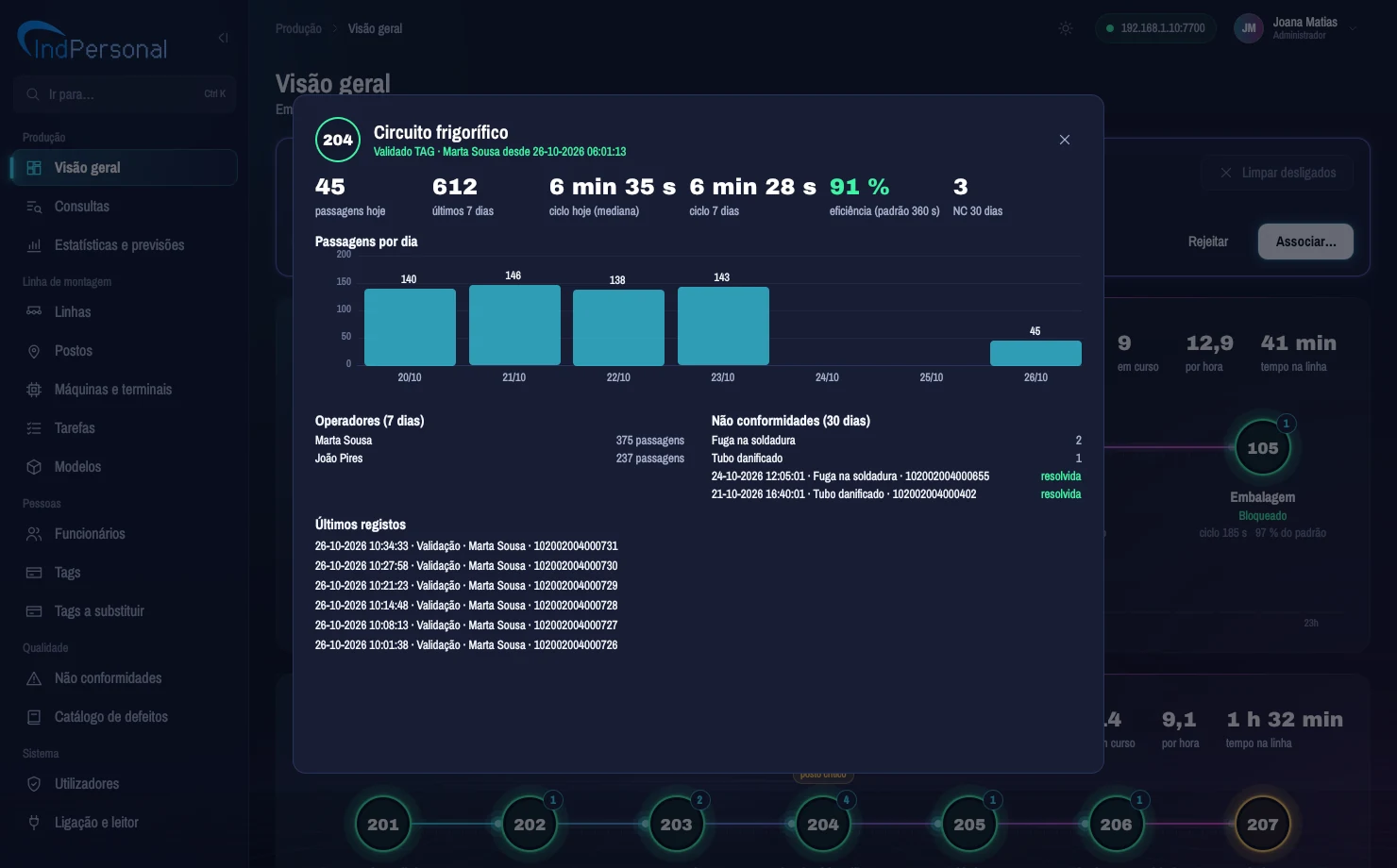
Opens the station sheet from the Overview.
Everything about the station
Passes today and over the last 7 days, median cycle, efficiency against standard time, passes per day, operators, non-conformities over the last 30 days and latest records.
The bottleneck in plain sight
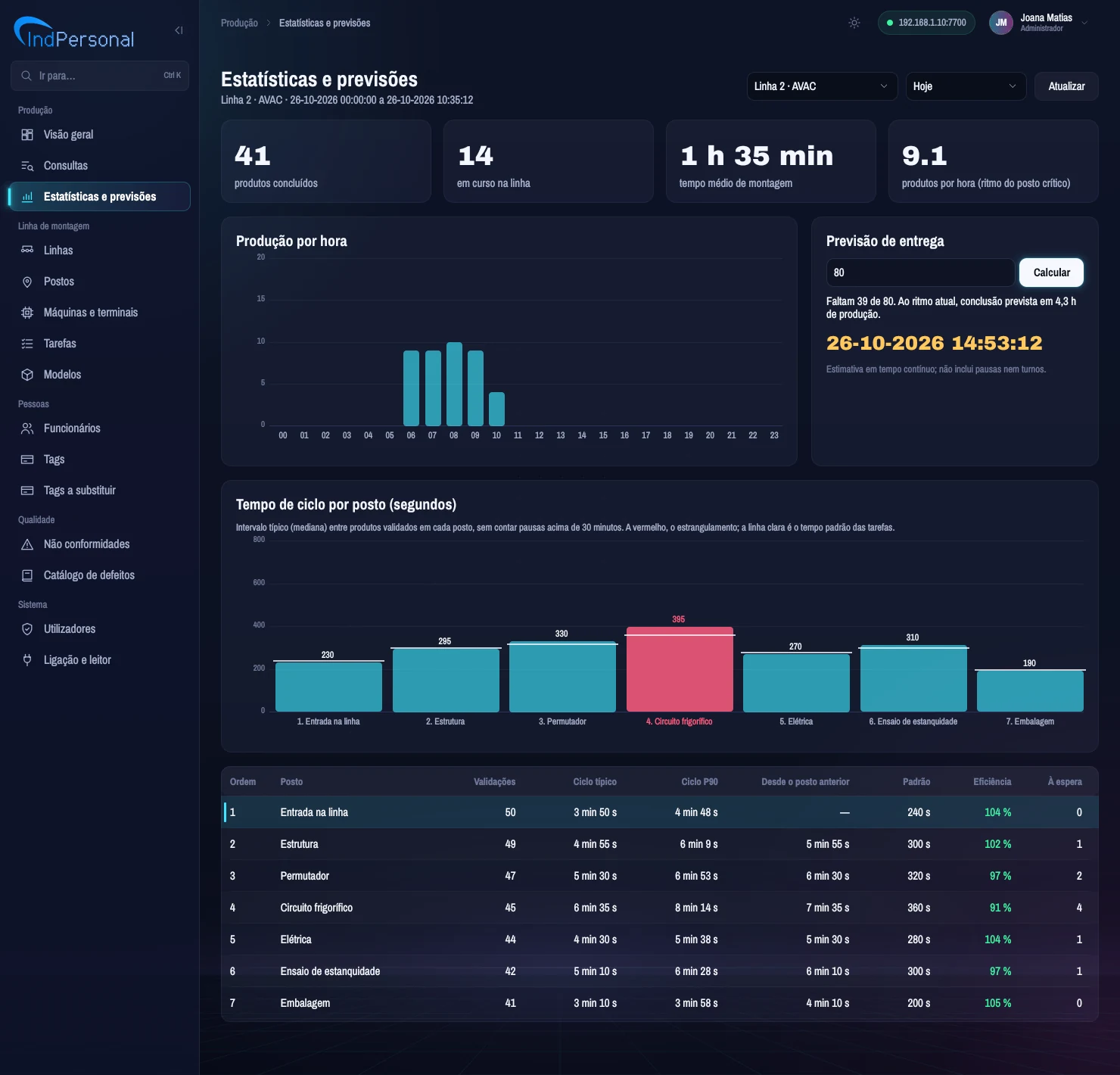
Cycle time per station compared with standard time. The slowest station sets the pace of the line.
OEE and downtime
OEE per line and period, planned time, downtime by reason and production target, so far and for the period.
When the order will be ready
For a production target, the system shows how many units are left and the expected completion date and time.
Queries and export
Events by period, line, station, operator, operation type or tag. Export to Excel (.xlsx) and CSV, ready for audits and reports.
Production terminals
Pairing of new terminals, name, status and version of each terminal, and remote configuration reload.
Quality
Recording and resolving non-conformities with the product tag, and a defect catalogue.
People and tags
Employees, tag personalisation on the desktop reader and the list of tags to replace.
Line configuration
Lines and station order, stations with tasks and minimum interval, models and tasks with standard time.
Access profiles
Administrator, Supervisor, Read-only and Non-conformities, with encrypted passwords. Dark or light mode.
Audit
Who changed what and when, with the value before and after, across all settings, terminal remote commands and tokens, terminal pairing and ERP integration. Viewable by administrators only, covering the last 90 days.
Shifts and downtime
Shifts with breaks per line, stop reason catalogue, list of stops with their duration and a printable barcode sheet of the reasons.
On any screen
Responsive interface for computer, tablet and Android phone, with a date picker and time pickers in every date and time field.
Reliability in industrial environments.
A line stoppage is costly. IndLine was designed so that a network or power failure neither interrupts production nor compromises the history.
Zero records lost
Every event is written to the terminal's memory, which survives power cuts, before it is sent. It is only deleted once the server confirms, and resends never duplicate records.
Works offline
Without the server, the terminal validates using the tag data and the list of authorised tags. Everything is sent when the connection returns. Decisions the server would not accept are flagged as anomalies for review.
Fast fault detection
The connection is checked every 2 seconds, with automatic reconnection.
Security
Individual credential per terminal, encrypted passwords, access profiles, database protection against injection and optional TLS encryption on the network.
Protected data
Replicated database, with backup and restore scripts.
Diagnostics
Tags to replace, status and version of each terminal and events still to send, all visible in IndPersonal.
A complete MES for SMEs,
without the usual complexity.
Large-vendor MES
- The complexity of a full system, when what matters is the essentials.
- Expensive industrial terminals.
- The cost of an MES from a large vendor, often with per-user licences or a cloud subscription.
IndLine
- The essentials of an MES: traceability, OEE, downtime, shifts, production orders and ERP integration.
- In your factory: installed on the factory's server, with no cloud and no per-user licences.
- Affordable equipment: custom-built, low-cost terminals with replaceable modules.
- Rare robustness: works offline and never loses data.
- Adaptable: own documented code and protocol, for specific needs and to integrate other equipment.
- Proven since 2013 and compatible with existing tags.
Lines with several stations in sequence.
SMEs with manual, semi-automatic or automatic-machine production that need unit-level traceability, OEE and a link between production and the ERP.
In development.
Features planned for upcoming versions, not yet available. If any of them is decisive for your factory, talk to us.
Installation requirements
for a line.
Example for a 7-station line with two shifts. Indicative quantities; the quote is prepared after an on-site survey.
| Equipment | Purpose | 7-station line |
|---|---|---|
| IndServer server | Linux PC or mini PC on the factory network, or a virtual machine | 1 |
| IndControl production terminals | 1 per station | 7 |
| Barcode reader | at the line entry station; at other stations if you want to report stops by barcode | 1 |
| Machine connection (optional) | cycle signal, sensor or relay contact on the terminal's digital input, to detect stops and count parts | depending on the line |
| 12/24 V power supply | one supply per terminal, or power from the panel | 7 |
| Ethernet network | cable to each station, the server, the screens and the management PC; a switch with spare ports | 10 points |
| IndMonitor screen | TV or wall monitor with a PC or mini PC | 1 |
| IndPersonal management PC | with a desktop tag reader to personalise tags | 1 + 1 |
| Mifare Classic 1K tags | operator (with spares), product (reusable), non-conformity and administration | 16 + 25 + 4 |
Customers of the 2013 system keep the tags they already have: they still work with IndLine.
Frequently asked questions.
What happens if the network or the server fails?
The line does not stop. The terminal keeps validating using the tag data and the list of authorised tags received in its last configuration, and stores every record in its memory. When the connection returns, it sends everything to the server, with no losses or duplicates.
Do operators need training?
Very little. The operator only presents tags: their operator tag to clock in and out at the station, and the product tag for each item. The terminal responds immediately with sound, light and a message.
What server is needed?
A Linux PC or mini PC on the factory network, or an existing virtual machine. The database has scripted backup and restore.
How is a new terminal installed?
Connect it to the network. The terminal finds the server by itself and appears in IndPersonal as a pairing request. One click pairs it with the right station and the configuration arrives automatically.
Can I get reports for audits?
Yes. Queries filter events by period, line, station, operator, operation type or tag, and export to Excel (.xlsx) and CSV.
We already have the old system. Will our tags work?
Yes. IndLine is compatible with the tags and way of working of the 2013 system: existing tags keep working.
Does it connect to our ERP?
Yes, with no development on the ERP side. IndLine receives production orders through a shared folder (CSV files), the REST API or file import, and sends back the result by file or webhook. It works with any ERP that exports and imports files or uses an API; the connection method is chosen during the site survey.
Does it need the cloud or per-user licences?
No. IndLine is installed on the factory's own server and has no per-user licences.
How is OEE calculated?
Availability × Performance × Quality, per line. Availability is the planned shift time, excluding breaks, minus unplanned stops; performance compares actual output with the standard time of the bottleneck station; quality counts the products with no non-conformities.
What about automatic machines, with no operator reading tags?
The terminal's digital input connects to the machine's cycle signal, a sensor or a relay contact. That way IndLine knows when the machine is running, detects stops and can count the parts produced.
Can it connect to other equipment?
IndLine uses its own documented protocol, which makes it possible to integrate other equipment. Each integration is assessed with our technical team during the survey.
Which languages is the interface in?
European Portuguese. English and Spanish translations are planned.
Book a demo
of IndLine.
We present the system in operation, with real terminals and screens, assess your line on site and prepare a tailored proposal.